
PCM5 to PCM6 Upgrade for Porsche – Dynamic Menu + Wireless Android Auto
New: a dynamic PCM menu that goes beyond PCM 6
On PCM 6, the factory menu bar stays on screen while CarPlay or Android Auto is running. On a PCM 5 with whole screen CarPlay or Android Auto that bar is gone: to reach any other PCM menu you go back to the CarPlay or Android Auto home screen, then tap the car icon. This upgrade brings the bar back and makes it dynamic.
- Move your hand towards the screen and the factory menu bar appears; CarPlay or Android Auto shrinks to make room.
- Move your hand away and the bar hides; CarPlay or Android Auto expands back to full screen.
- Tap any factory menu directly, without leaving CarPlay or Android Auto first.
- The right-hand extension menu that only PCM 5 has can be opened as well – not possible in full screen before.
This product includes both: the new interface and native wireless Android Auto. The new interface needs whole screen CarPlay or whole screen Android Auto already on the car, and works with either.
Only want the new interface? If you use whole screen CarPlay, or you bought whole screen Android Auto from us and do not need wireless, the interface on its own is USD 99 – order the PCM5 Dynamic Menu Upgrade here.
Wireless Android Auto: only for PCM 5 cars that already have Android Auto activated
Check first: the wireless part of this upgrade makes your existing wired Android Auto wireless. If your Porsche does not have Android Auto yet, buy the Android Auto activation first — Full-Screen Android Auto Activation (PCM4.1 / PCM5) or the Whole-Screen CarPlay + Android Auto Bundle (PCM5) — then come back for this wireless upgrade.
Already have Android Auto from us? This is a different thing
The Android Auto activation you bought switches Android Auto on in the PCM – and it keeps working exactly as before; nothing about it changes. What PCM 5 never had, by design, was wireless connectivity for Android Auto: the PCM 5 architecture only ever passed a wireless link to CarPlay. This upgrade changes the PCM 5 system itself so it can carry that wireless link and hand it to the Android Auto you already have. That is why it is a separate product: one is Android Auto (already activated on your car), the other is the PCM 5 system's ability to run it wirelessly. Android Auto has to be activated first; this upgrade then makes it wireless.
PCM 5 already supports wireless CarPlay. Now it does native wireless Android Auto too.
PCM 6 has native wireless Android Auto from the factory, PCM 5 only had wireless CarPlay. This upgrade closes that difference. This upgrade takes the wired Android Auto your car already has and makes it native wireless Android Auto on Porsche PCM 5, with no external USB dongle.
PCM 5 already supports wireless CarPlay, so the hardware was capable; the challenge was making Android Auto use that capability natively.
Android phone → PCM 5 directly → Wireless Android Auto. No external USB dongle required.
Recognise any of these?
- Apple CarPlay starts wirelessly on your PCM 5 — but Android Auto still needs the cable.
- A PCM 6 car does native wireless Android Auto straight from the factory. Yours does not.
- Your car's Android Auto works — it is just tied to the USB port.
- Your phone stays paired to the wireless dongle after you get out of the car – some owners end up putting the phone in airplane mode for half an hour so it lets go.
- The dongle takes a while to connect every time you start the car, and it lags.
- Android Auto shows up under an Apple CarPlay icon, and a second phone connecting knocks it off.
What you get
- Native wireless Android Auto on Porsche PCM 5, upgrading a car that currently has wired Android Auto.
- No external USB dongle required.
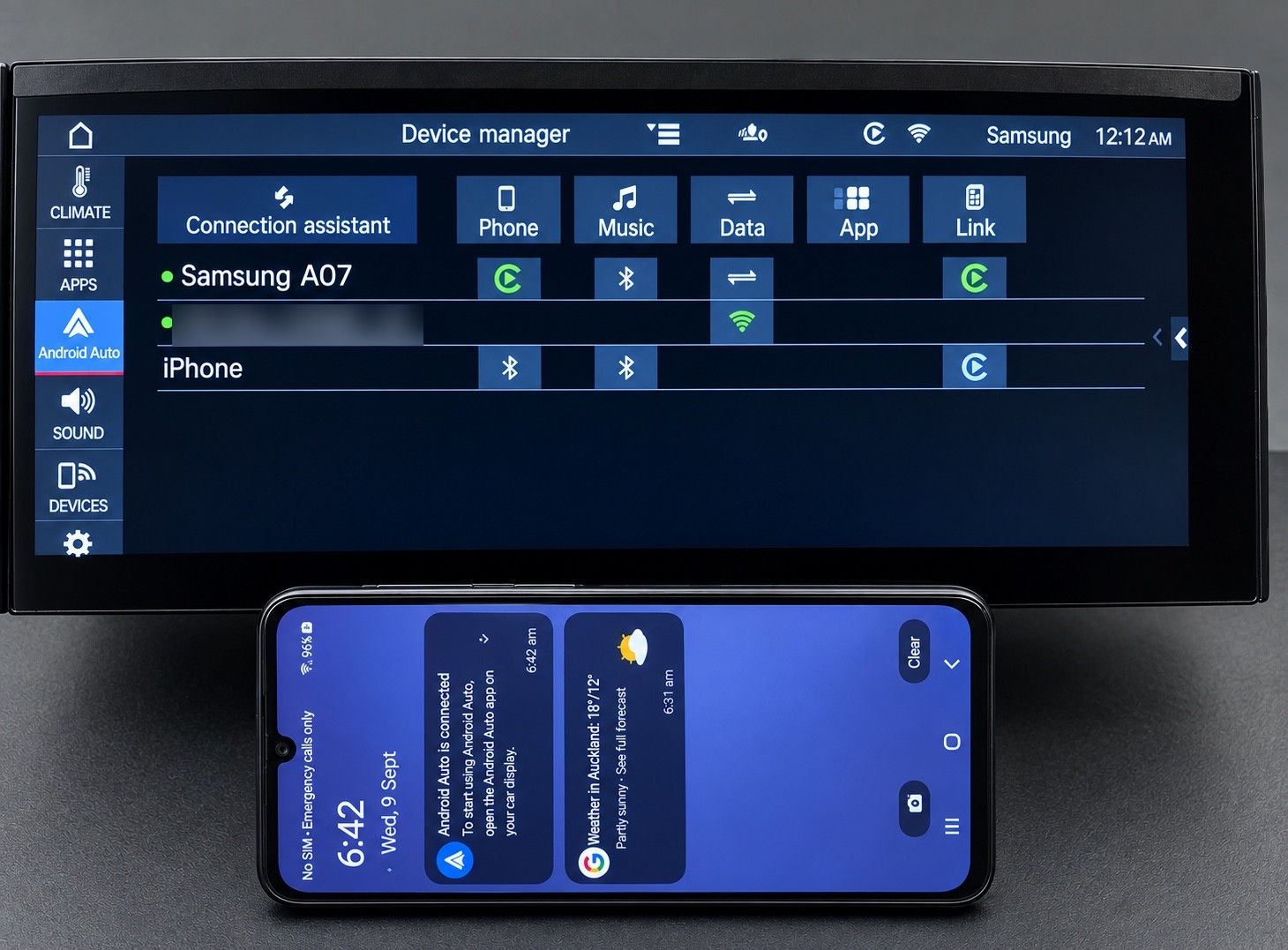
- PCM now correctly shows the Android Auto name and icon instead of the previous CarPlay reference.
- The Android phone's connectivity functions are properly displayed in Device Manager.
Is this a new Android Auto? No – it's a PCM 5 upgrade
Android Auto itself does not change – nothing on the Android Auto side of the PCM is touched. PCM 5 was designed without wireless connectivity for Android Auto. This is a system upgrade for PCM 5, two years in development, that adds that native wireless connectivity and passes it through to Android Auto. If your car already has Android Auto activated, this upgrade is all you need – the dongle goes.
What changes day to day
- Android Auto starts as soon as the screen comes up – about 30 seconds – natively, with no lag.
- The wireless link ends the moment the screen goes off, so your phone doesn't stay hooked to a dongle after you leave the car.
- An iPhone on CarPlay and an Android phone on Android Auto can both stay connected, and you switch between them freely – Android Auto is no longer knocked off when a CarPlay phone connects.
- PCM shows the correct Android Auto name and icon, and the phone shows properly in Device Manager.
This upgrade is for a PCM 5 car that already has wired Android Auto.
Does my Porsche have PCM5?
- Macan — 2019 to current (petrol)
- Cayenne — 2018–2021
- Panamera — 2021
- 911 (992) — 2019–2021
PCM 6 cars are not eligible — 2023+ Cayenne, 2024+ Panamera, 2025+ 911, 2024+ Macan EV. They do not need it: they already have native wireless Android Auto from the factory.
What changes on your PCM 5
| PCM 5 (factory) | PCM 5 with this upgrade | |
|---|---|---|
| Native wireless Android Auto | ✗ | ✓ |
| PCM menu bar while CarPlay / Android Auto is full screen | ✗ | ✓ (appears when your hand approaches) |
| PCM 5 right-hand extension menu in full screen | ✗ | ✓ |
| External USB dongle | Needed for wireless Android Auto | Not required |
| Android Auto name and icon shown in PCM | ✗ (shows the previous CarPlay reference) | ✓ |
| Android phone connectivity shown in Device Manager | ✗ | ✓ |
How you get it
Delivered online straight to your car — no parts shipped, no dealer visit. Activated remotely over the internet after a quick one-time setup.
Full step-by-step is in How It Works & Installation Guide below, or open the guide now: https://carsoft.co.nz/dl/guide/activation.html
For background on Porsche PCM5 eligibility and the difference between activation, full-screen display and wireless connection, read the Porsche PCM5 native wireless Android Auto guide.One car per code. Questions before you order: info@innovativesoft.co.nz
Frequently Asked Questions
What is the new dynamic menu interface?
On a PCM 5 with whole screen CarPlay or Android Auto, the factory menu bar disappears and you have to go back to the CarPlay or Android Auto home screen and tap the car icon to reach any other PCM menu. With this upgrade the factory menu bar appears when your hand approaches the screen, and CarPlay or Android Auto shrinks to make room. When your hand moves away the bar hides and the picture expands back to full screen. The right-hand extension menu that only PCM 5 has can be opened as well.
I only use CarPlay - can I get the new interface?
Yes. The new interface works with whole screen CarPlay or whole screen Android Auto; one of the two must already be on the car. If you use whole screen CarPlay and do not need wireless Android Auto, the interface on its own is USD 99 - order the PCM5 Dynamic Menu Upgrade.
I already have whole screen Android Auto from you and do not need wireless - can I get just the interface?
Yes. The interface on its own is USD 99 for our existing whole screen Android Auto customers - order the PCM5 Dynamic Menu Upgrade. If you want native wireless Android Auto as well, buy this product; it includes both.
I already bought the Android Auto activation from you – why is this a separate purchase?
Because they are two different things. Your Android Auto activation switched Android Auto on in the PCM and it stays exactly as it is. PCM 5, by design, never supported wireless connectivity for Android Auto – the system only passed a wireless link to CarPlay. This upgrade changes the PCM 5 system so it can carry that wireless link and hand it to the Android Auto you already have. It does not replace, redo or touch your existing activation.
My Porsche has no Android Auto at all — can I buy this upgrade?
Not on its own. This upgrade makes existing wired Android Auto wireless. If your PCM 5 car does not have Android Auto yet, buy the Full-Screen Android Auto Activation (PCM4.1 / PCM5) or the Whole-Screen CarPlay + Android Auto Bundle (PCM5) first, then this upgrade makes it wireless.
Can I get wireless Android Auto on a Porsche PCM5?
Yes, on PCM 5 cars. This upgrade takes the wired Android Auto your car already has and makes it native wireless Android Auto on Porsche PCM 5, with no external USB dongle. PCM 5 cars: Macan 2019-current (petrol), Cayenne 2018-2021, Panamera 2021, and 992 2019-2021.
My Porsche can do wireless CarPlay - why doesn't Android Auto work the same way?
PCM 5 already supports wireless CarPlay, so the hardware was capable; the challenge was making Android Auto use that capability natively. This upgrade is what closes that gap.
PCM 5 vs PCM 6 - what is the difference for Android Auto?
PCM 6 has native wireless Android Auto from the factory. PCM 5 only had wireless CarPlay, and this upgrade closes that difference. PCM 6 cars are not eligible for this upgrade and do not need it.
Does wireless Android Auto work on the Macan, Cayenne, Panamera and 992?
PCM 5 cars: Macan 2019-current (petrol), Cayenne 2018-2021, Panamera 2021, and 992 2019-2021.
Do I need an external USB dongle or adapter?
No. Android phone to PCM 5 directly to wireless Android Auto. No external USB dongle required. The SD/USB stick is only for the one-time setup - you remove it at Update successful. Nothing stays plugged into the car.
What changes on the screen after the upgrade?
PCM now correctly shows the Android Auto name and icon instead of the previous CarPlay reference, and the Android phone's connectivity functions are properly displayed in Device Manager.
How is it delivered, and do you need my VIN?
Delivered online straight to your car - no parts shipped, no dealer visit. We email a small setup file and a redeem code; you copy the file to the root of an SD/USB stick (FAT32) and insert it in the car. Then you open our activation page, enter your redeem code and your car's VIN, and press Activate (one car per code). Finally, drive with internet - mobile data or a hotspot - and the car checks in, downloads and installs by itself. It is locked to your VIN, fully reversible, and there is no firmware reflash.
What does it cost?
The price shown at the top of this page. One car per code.
Is this a new or different version of Android Auto?
No. Android Auto stays exactly as it is – that part of the PCM is not touched. PCM 5 was built without wireless connectivity for Android Auto; this upgrade adds that native wireless connectivity at the PCM 5 system level and passes it through to Android Auto.
I already have Android Auto from you and use a wireless dongle – what does this change?
The upgrade replaces the dongle with the car's own native wireless link. Nothing stays plugged in, and because Android Auto is already activated on your car, the upgrade is all you need.
How quickly does it connect compared with a dongle?
Natively, as soon as the screen starts – about 30 seconds – with no lag. Dongles bridge the connection and typically take longer and stutter.
Will my phone stay connected to the car after I get out?
No. The native wireless link shuts off as soon as the screen is off, so your phone is free straight away – no more airplane-mode trick to make a dongle let go.
Can an iPhone and an Android phone both be connected?
Yes. An iPhone on CarPlay and an Android phone on Android Auto can both stay connected wirelessly and you switch between them freely – Android Auto is no longer knocked off when a CarPlay phone connects.
How It Works & Installation Guide
📄 Installation Guide — full step-by-step (open on phone or computer):
https://carsoft.co.nz/dl/guide/activation.html
It's the same guide we email you after purchase.
How it works
Delivered online straight to your car — no parts shipped, no dealer visit. Activated remotely over the internet after a quick one-time setup.1. One-time setup (~3–5 min)
We email a small setup file + a redeem code. Copy the file to the root of an SD/USB stick (FAT32), start the car and insert it — a Software Update screen runs automatically and installs a small helper; remove the card at Update successful. No menus or coding on your side.The SD/USB stick is only for the one-time setup — you remove it at Update successful. Nothing stays plugged into the car.
2. Redeem your code
Open our activation page, enter your redeem code and your car's VIN, press Activate (one car per code).3. Drive with internet
Mobile data or a hotspot — the car checks in, downloads and installs by itself, restarts once. Done.Good to know
Locked to your VIN, fully reversible, no firmware reflash. After this one-time setup, any future feature you buy needs only the redeem step.What you'll need
Redeem code, 17-character VIN, an SD/USB (FAT32), and internet in the car. Questions: info@innovativesoft.co.nzPCM 5 vs PCM 6
Two things separated PCM 5 from PCM 6: native wireless Android Auto, and the factory menu bar staying available while CarPlay or Android Auto is on screen. This upgrade closes both.
PCM menu bar during CarPlay / Android Auto
PCM 6: stays on screen. PCM 5 with whole screen CarPlay or Android Auto: gone. PCM 5 with this upgrade: appears when your hand approaches the screen and hides when it moves away, and the PCM 5 right-hand extension menu can be opened as well.
Native wireless Android Auto
PCM 5 from the factory: no. PCM 6 from the factory: yes. PCM 5 with this upgrade: yes.
External USB dongle
Not required. Android phone to PCM 5 directly to wireless Android Auto.
On-screen result
PCM now correctly shows the Android Auto name and icon instead of the previous CarPlay reference, and the Android phone's connectivity functions are properly displayed in Device Manager.
Which cars are which
PCM 5: Macan 2019-current (petrol), Cayenne 2018-2021, Panamera 2021, 992 2019-2021. PCM 6 cars - 2023+ Cayenne, 2024+ Panamera, 2025+ 911, 2024+ Macan EV - are not eligible and do not need this upgrade.
