
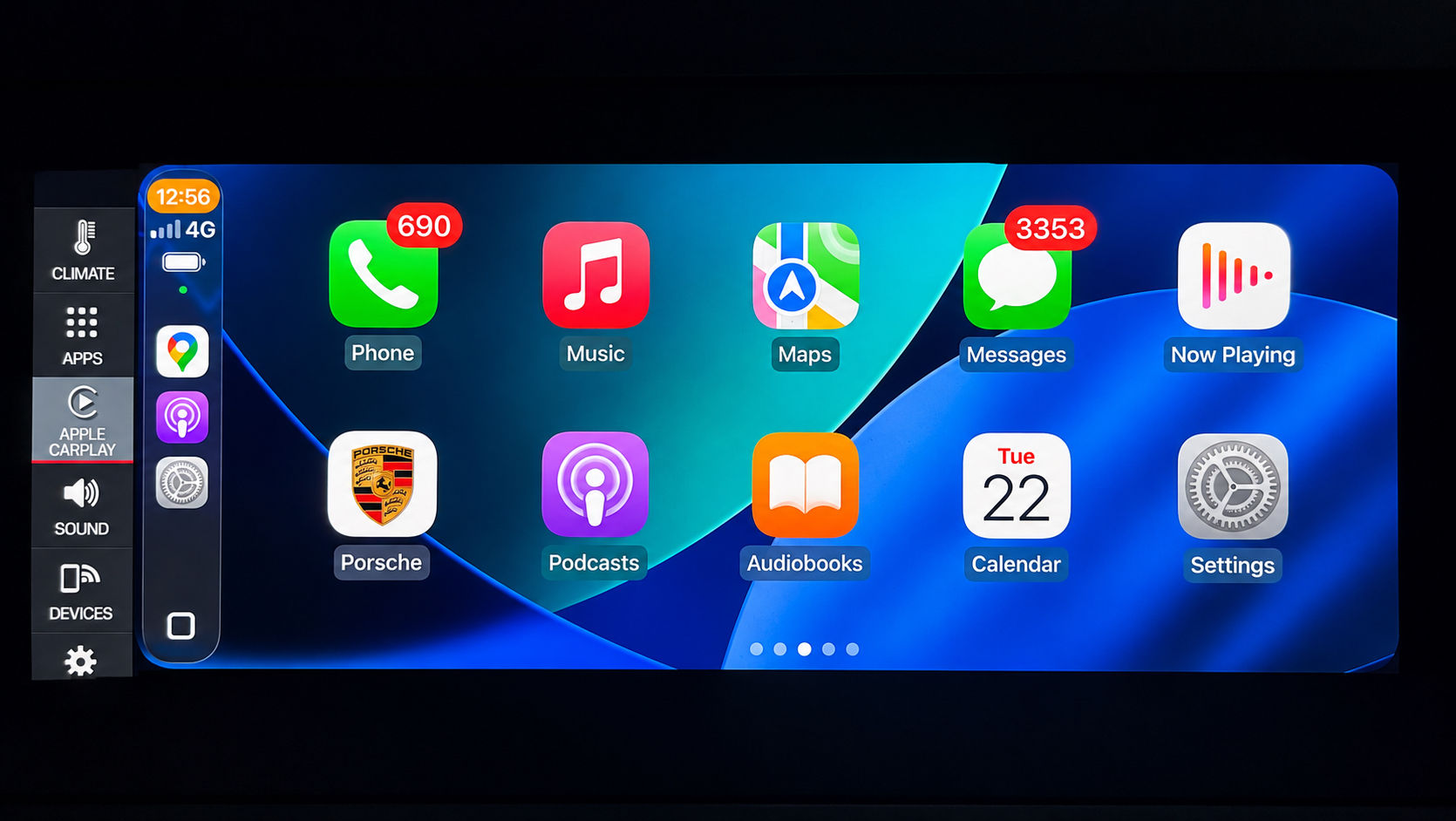

Whole Screen CarPlay + Android Auto Bundle for Porsche PCM5
NEW – the factory sidebar now stays on screen (PCM 6-style layout)
Whole Screen mode used to take over the entire display: the factory left menu disappeared, and to reach Climate, Devices or Settings you had to exit back to the main menu via the Porsche icon. Our latest update keeps the PCM 5's own sidebar on screen while CarPlay or Android Auto runs whole-screen — one tap to any factory screen, one tap back. It is the same layout PCM 6 ships with from the factory. CarPlay / Android Auto themselves are unchanged; this is purely the on-screen layout.
Every new Whole Screen order now includes it. Already bought Whole Screen from us earlier? The sidebar upgrade is US$99 — order the PCM5 Dynamic Menu Upgrade here. Read the full story of the sidebar update here. (Please note , $99 is not including the wireless connectivity support for Andriod auto ) , if you need to add wireless connectivity support for Andriod auto , you need to look at another product in product page )
PCM5 CarPlay and Android Auto development since 2020
Innovative Soft has developed Porsche PCM5 display and connectivity solutions since 2020. For eligible configurations, the programme can cover whole-screen CarPlay and Android Auto, remote support for region-restricted wireless CarPlay, and native wireless Android Auto without a permanently connected dongle.
The latest dynamic interface keeps the factory sidebar available in a PCM6-style layout on supported PCM5 configurations. These are separate outcomes: confirm the PCM generation, firmware, original market, existing feature state and requested result before ordering.
Recognise any of these?
You plug in your phone and CarPlay only takes up a small box in the corner of your PCM screen — the rest is just wasted space.
Your dealer quoted you over $1,000 to add CarPlay, and that's before labour.
You've found "activation" and you're not sure if they're legitimate or if they'll void your warranty.
Android Auto works, but it's stuck in a tiny window and you can't read the navigation without squinting.
You bought your Cayenne, Macan, or Panamera used and the previous owner never paid for the smartphone integration option.
You've seen the full-screen setup in a newer Porsche and can't understand why yours doesn't do the same thing.
Full-Screen Android Auto & CarPlay for Porsche PCM5
Native · Full Screen · Safe · Proven · No Fake FEC · No Firmware Modification
Whole Screen CarPlay · Whole Screen Android Auto · Porsche Android Auto Full Screen
Premium, Risk-Free Smartphone Integration Upgrade
This product provides a professional, OEM-correct solution to enable:
Native Android Auto (full screen)
Apple CarPlay (full screen – factory is only 2/3 screen)
Video in Motion (VIM)
on Porsche PCM5 systems.
From factory, CarPlay uses only part of the screen, Android Auto is disabled, and video/navigation input is restricted while driving.Our solution resolves all of these limitations properly and safely.
Why Android Auto Is Disabled on PCM5 from Factory
Android Auto was not enabled by default on many PCM5 systems due to early technical challenges:
Screen resolution and aspect-ratio compatibility
UI scaling and stability
Multi-device session handling
CarPlay ↔ Android Auto switching issues
PCM5 development history and current scope
Innovative Soft has developed this PCM5 solution for supported configurations and continues to refine the display and connectivity workflow.
Since 2020, Innovative Soft has developed PCM5 retrofit solutions for customers worldwide. Supported outcomes may include:
Native Android Auto activation
True full-screen (1920×720 HD) Android Auto
Full-screen CarPlay conversion
Reliable multi-device switching
Permanent fix for Android Auto not launching after CarPlay
Why UI Modification Is Required (and Why Ours Is Safe)
Factory UI files are designed for partial-screen layouts.Full-screen operation requires UI restructuring.
Other possible solutions often:
Copy modified UI/Java files
Load duplicate UI layers
Cause instability or update issues
Our method:
Recompiles UI specifically for your PCM firmware
Loads only one UI instance
Maintains correct resolution, icon size, and display ratio
Result: stable, native full-screen CarPlay and Android Auto.
Video in Motion (VIM)
Video in Motion is also enabled, which:
Removes unnecessary driving restrictions
Allows destination input while driving
Improves real-world navigation usability
Always operate the vehicle responsibly.
No Fake FEC · No Firmware Modification
Some other solutions enable features by:
Modifying firmware
Injecting fake Feature Enabling Codes (FEC)
Bypassing security checks
Our solution:
❌ No firmware modification
❌ No fake or simulated FEC codes
❌ No security bypass
Everything is activated natively, preserving system integrity and update compatibility.
What This Product Includes
Full-screen Apple CarPlay
Native Android Auto activation
Full-screen Android Auto (1920×720 HD)
Video in Motion (VIM)
Destination input while driving
Stable UI (single instance)
Reliable CarPlay ↔ Android Auto switching
No factory reset required
Proven & Trusted
PCM5 development history is documented from 2020
Worldwide customer and workshop support
300+ verified 5-star reviews
Trusted by Porsche owners worldwide
Supported PCM5 Models
911 (992): 2019–2021
Cayenne: 2018–2021
Macan: 2019–Current
Panamera: 2021
Summary
Factory CarPlay limited to 2/3 screen
Android Auto disabled by default
Video restricted while driving
Supported full-screen CarPlay and Android Auto solution
Full-screen CarPlay & Android Auto
Video in Motion enabled
Proven, safe, and warranty-friendly
Choose a professional solution. Avoid shortcuts. Enjoy peace of mind.
Are you a workshop? We do this coding remotely for independent Porsche specialists while the car is on your ramp — you keep the customer and the labour, no PIWIS licence required. How trade accounts work.
Frequently bought together
Customers who activate full-screen CarPlay most often add these two.
Wired-to-Wireless CarPlay & Android Auto Adapter – Universal USB Dongle — US$160.92
Full-Screen CarPlay Media Box for Porsche – PCM4 / PCM4.1 / PCM5 — US$340.20
New: Android phone owner with a PCM 5 car? Once Android Auto is activated, add the native wireless Android Auto upgrade – no dongle.
How It Works & Installation Guide
📄 Installation Guide — full step-by-step (open on phone or computer):
https://carsoft.co.nz/dl/guide/activation.html
It's the same guide we email you after purchase.
How it works
Delivered online straight to your car — no parts shipped, no dealer visit. Activated remotely over the internet after a quick one-time setup.1. One-time setup (~3–5 min)
We email a small setup file + a redeem code. Copy the file to the root of an SD/USB stick (FAT32), start the car and insert it — a Software Update screen runs automatically and installs a small helper; remove the card at Update successful. No menus or coding on your side.2. Redeem your code
Open our activation page, enter your redeem code and your car's VIN, press Activate (one car per code).3. Drive with internet
Mobile data or a hotspot — the car checks in, downloads and installs by itself, restarts once. Done.Good to know
Locked to your VIN, fully reversible, no firmware reflash. After this one-time setup, any future feature you buy needs only the redeem step.What you'll need
Redeem code, 17-character VIN, an SD/USB (FAT32), and internet in the car. Questions: info@innovativesoft.co.nz
